Uninstall Windows® applications EASILY and COMPLETELY.

uninstaller software

Quick Links

View screen shots

Upgrade? Click here

Having trouble uninstalling a program?

Do you have programs that you can not get rid of from your PC? Is your computer become slower and slower? Did you often receive unexpected errors?

They can be fixed! Download Your Uninstaller! 2008 for a free fix!

Free Fix

What's the problem?

You may often install trial version programs, and if you do not like the program, you need to uninstall it. But sometimes you will find it impossible to uninstall certain program, it keeps staying in Windows installed programs list and reports many errors, many junk files and registry keys/values were left on your PC. These programs will cause system problems and slow down Windows quite a lot.

How to fix the problem?

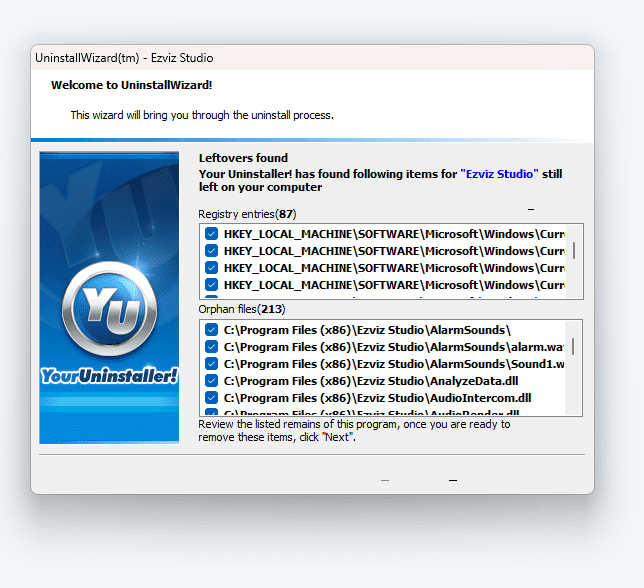
Your Uninstaller! 2008 is just the key to solve these problems, it can remove any installed program and clear all the left traces. Whenever you uninstall a program, Your Uninstaller! 2008 removes it completely! Nothing left.

Details about Your Uninstaller! 2008


"PCs inevitably accrue a mass of unwanted and unused files that eat up system resources and reduce system stability. Uninstalling these items can be an arduous task, but Your Uninstaller Pro simplifies the process considerably..." - CNET Review


Key benefits

Uninstall any installed program completely, even corrupted ones.

  • Fix invalid uninstallations in one click.
    If you often install/uninstall software, you will most probably face these corrupted programs, let Your Uninstaller! 2008 fix them.
  • Full system scan after a program being uninstalled for complete removal.
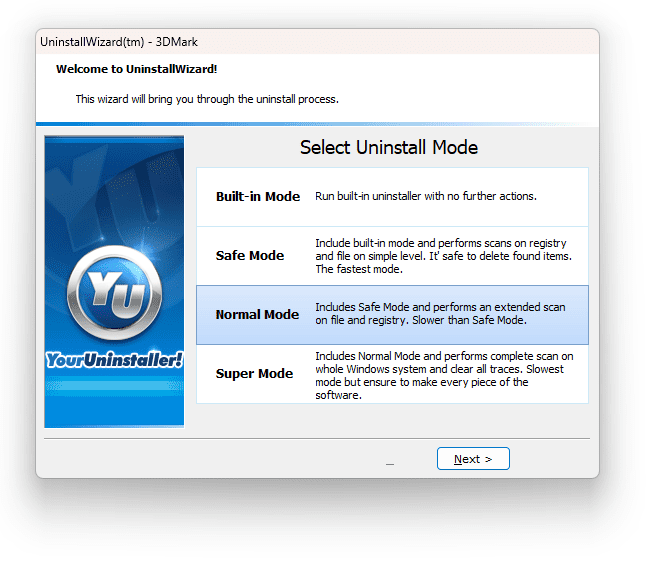
    Your Uninstaller! 2008 scans whole system for related traces and completely remove them after normal uninstallation, you will not notice the program has ever installed.
  • Force removal of a program.
    For some hard to remove programs, this is a good choice, extremely useful for old-fashion programs.
  • Keep system stable and clean with various system tools.
    Your Uninstaller! 2008 has built-in system tools like Uninstaller, Startup Manager, Internet Traces Eraser, StartMenu Manager, Disk Cleaner to keep Windows clean and in order.
  • Easy to Use. No expert knowledge required.
    Usability is always in our mind when developing products, Your Uninstaller! 2008 is simple and straightforward to complete all tasks. No hassle, no confusion.
  • Windows Vista Compatible.
    Your Uninstaller! 2008 is Windows Vista Compatible both for 32bit and 64bit versions. Of course, it also works for Windows XP and perfectly.
  • Safe and Trusted.
    Your Uninstaller! 2008 is 100% virus and spyware free. No crashes, seizures, slow downs and error messages with the safest and most trusted solution from a leading software vendor.

For more product information about Your Uninstaller! 2008: please click here. Your Uninstaller! 2008 Product Information


Purchasing is RISK FREE

100% Satisfaction "100% Satisfaction, Try It For Full 21 Days Or Get Your Money Back GUARANTEE!"

At URSoft we believe in happy customers. We believe all our products do their job, and do it well. But we're realistic enough to know that our software isn't going to fit every situation. That's why we have a strong refund policy.


Get ready to make your computer faster and clearer than ever? Here we go...

online transactions

We use the Atlantic Coast SWREG and eSellerate secure server to handle our online transactions. We accepts Master card, Euro card, VISA, Delta, JCB, Switch, Solo, Discover, American Express, Diner's Club, UK cheque, US check, Euro cheque, Post cheque, International Money Order, Bank wire and PayPal. All transactions is 100% secure and safe. If you are afraid to use your credit card over internet, we suggest you use PayPal or Phone/FAX order.

Buy Now

Over 2.5 million users Can't Be Wrong! See what the magazines and our users say...

smartheader   If you've uninstalled software from your PC before, you probably know that you can use the Add/Remove Programs feature in the Control Panel to remove programs. Your Uninstaller! makes it easier to uninstall programs. Simply drag the program to the Your Uninstaller! con and the uninstall process begins. Your Uninstaller! lets you remove programs that do not appears on the Add/Remove Programs list. You can also use Your Uninstaller! to remove clutter(unnecessary files that programs occasionally leave behind) from your Registry.  
pcpluslogo   Your Uninstaller! shows all your programs with nice icons with extreme fast speed, uninstalls programs easily and completely with a single drag&drop. Just find out new way to uninstall unwanted programs!  
www.wugnet.com


spbanner


bnr-microsoft Pick of the week in "Exploring Windows XP" newsletter.
zdnet "Your Uninstaller uninstaller software shows you all of your programs' icons in a huge scrollable window that's easy to navigate. If you want more information about a program before you uninstall it, it's just two clicks away. "
Jason Parker - ZDNET
www.asp-shareware.org We are member of Association of Shareware Professionals.
  •   It's just the program I am looking for! It really helps! I have a lot of apps installed on my computer, sometimes it makes things much troubled, your product does make my PC clean, thanks for your good work. Just keep up.  

    Regards, Anderson.J

  •   Hi, I've download Your Uninstaller! and tried on my mobile PC, it's really great! Very fast speed,nice interface,handy functions. I've tried several uninstallers, but this is my choice. Thanks for creating such a wonderful software! I have been recommending to all my friends!  

    Bye Wiliiam

  •   I've been using your Your Unistaller! program and I think it is a great product! It is definitely much much better than Windows Add/Remove program. I congratulate you for a great product and I really recommend it!!!. Thank You.  

    ARTURO RIVERA

  •   Definitely recommended.. I got so much free space on the PC after using this program.  

    Peter Nishan

  • If you're still not sure, try it out 21 days forFREE! A shareware version is available by clicking here - you can only uninstall 2 applications per session.
    Buy Now